What Warmio does
Find and score leads
Saved searches, scored by Claude against who you sell to, then checked by hard rules.
Contacts and emails
The right person for your job titles and a verified work email. Bounced addresses aren't offered again.
Drafts you approve
Plain-text emails written from what's on their site. Each one waits for you to approve, edit or reject it.
Safe sending
Daily caps, warm-up, opt-outs and country rules, checked before every send. Bounces or spam complaints pause it.
Inbox and reply assistant
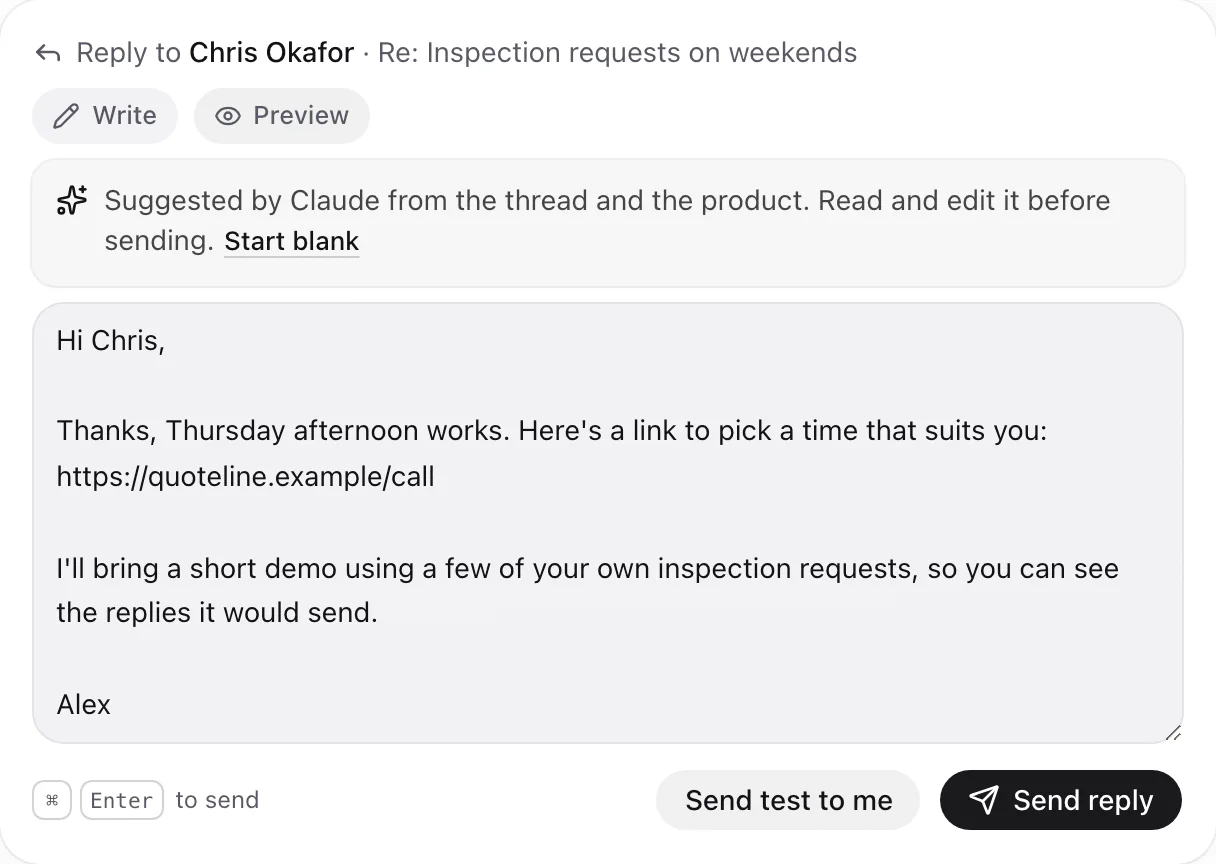
Replies are labelled, like interested or opt-out, and get a suggested answer you edit and send.
Agent access (MCP)
The dashboard is an MCP server. Each agent gets its own key with permissions, an expiry and a log.
The problem
A good cold email takes research. Most outreach skips it.
So it turns into a list, a template and hundreds of sends. People can tell, replies don't come, and your domain pays for it. Warmio does the research, so every email is about the company it goes to.
Who to write to
UsuallyA bought list of companies that match a job title and a headcount.
With WarmioCompanies that show the problem on their own site, scored against who you sell to, with the right person to write to.
What to say
UsuallyOne template, with a first name swapped in.
With WarmioA draft that names what it found on their site and why you're writing. You read it, edit it and approve it.
Where it lands
UsuallyHundreds of sends a day from a new domain, until it all goes to spam.
With WarmioFrom your own domain, starting at 5 a day. It pauses itself after a spam complaint and honors every opt-out.
Examples of signals it can check on a company’s site. You write your own.
- No help centerSupport page
- Ships in 5–7 daysShipping page
- Contact form onlyContact page
- No live chatEvery page
- Quotes by emailServices page
- No order trackingOrders page
- Booking by phone onlyBooking page
- Voicemail after 5 pmContact page
- Returns by emailReturns page
- FAQ last updated 2021FAQ page
How it works
From a problem you can see to a draft you can check.
You say who you sell to and which signals show the problem. It does the research and the writing in between.
Finds and scores companies. Each one is checked against your signals and scored. Low scores are skipped, so you read fewer emails, and better ones.
Writes from what it found. Each draft cites what it saw on the company’s site and says why the lead was picked.
Hi Sam, your shipping page says orders take 5–7 business days, and I couldn’t find a place to ask where one is.
Sends in their working hours. Turn on the send window and approved emails go out Tuesday to Thursday mornings, their time.
Inside Warmio
The whole loop. On one screen.
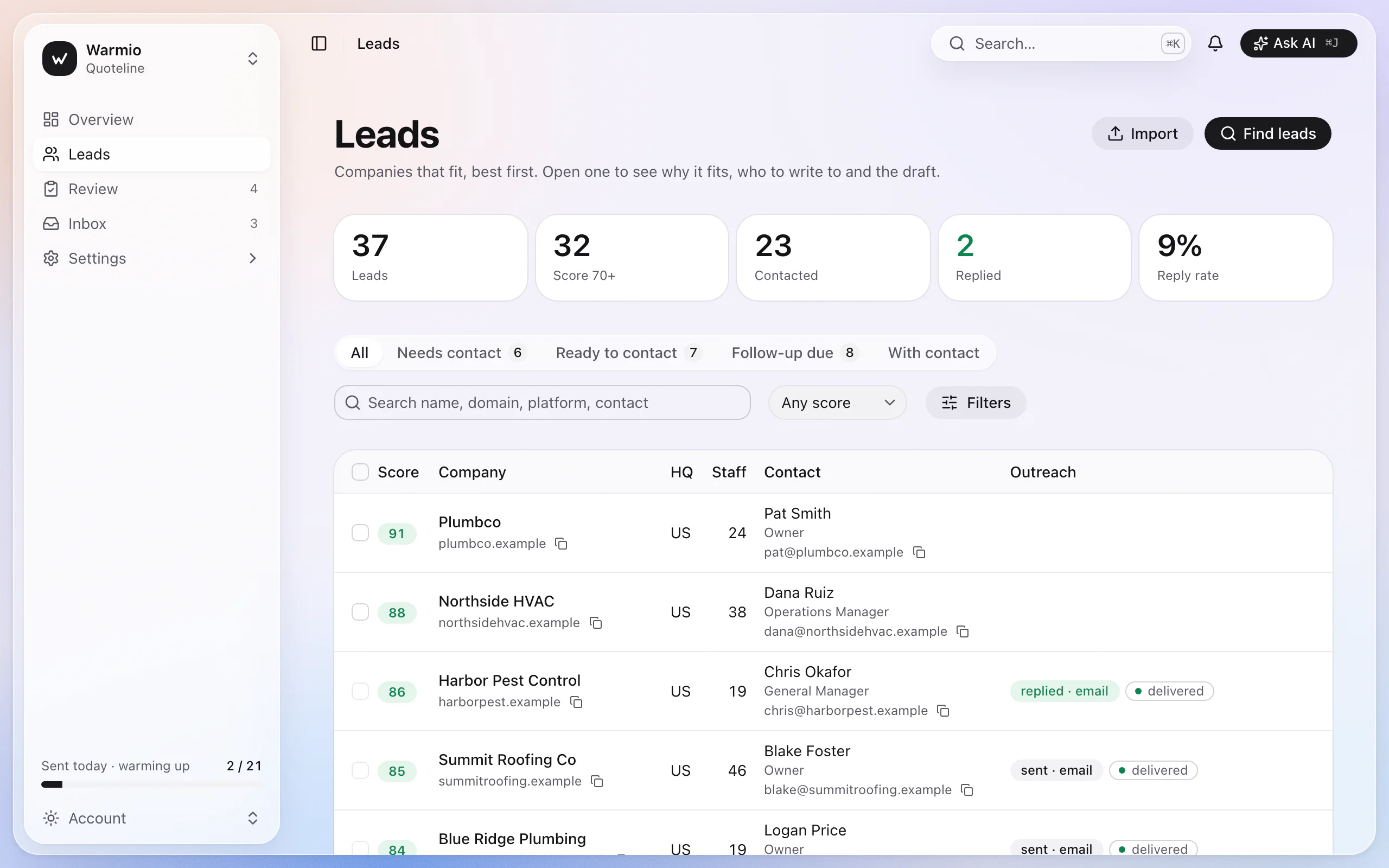
From the search to the reply. These are screenshots of the real dashboard, filled with sample data.
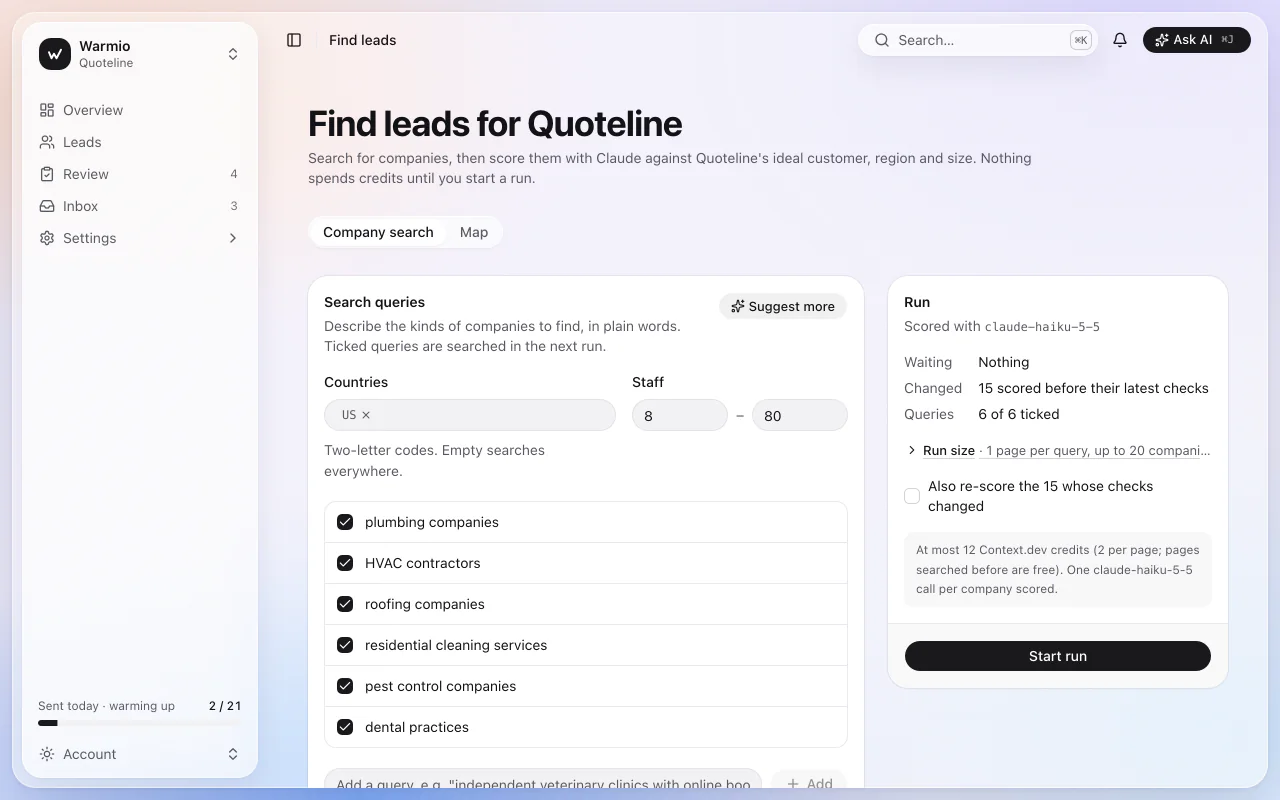
Find leads Describe the companies you sell to, pick countries and size, and it searches, researches and scores them. Nothing spends credits until you start a run. 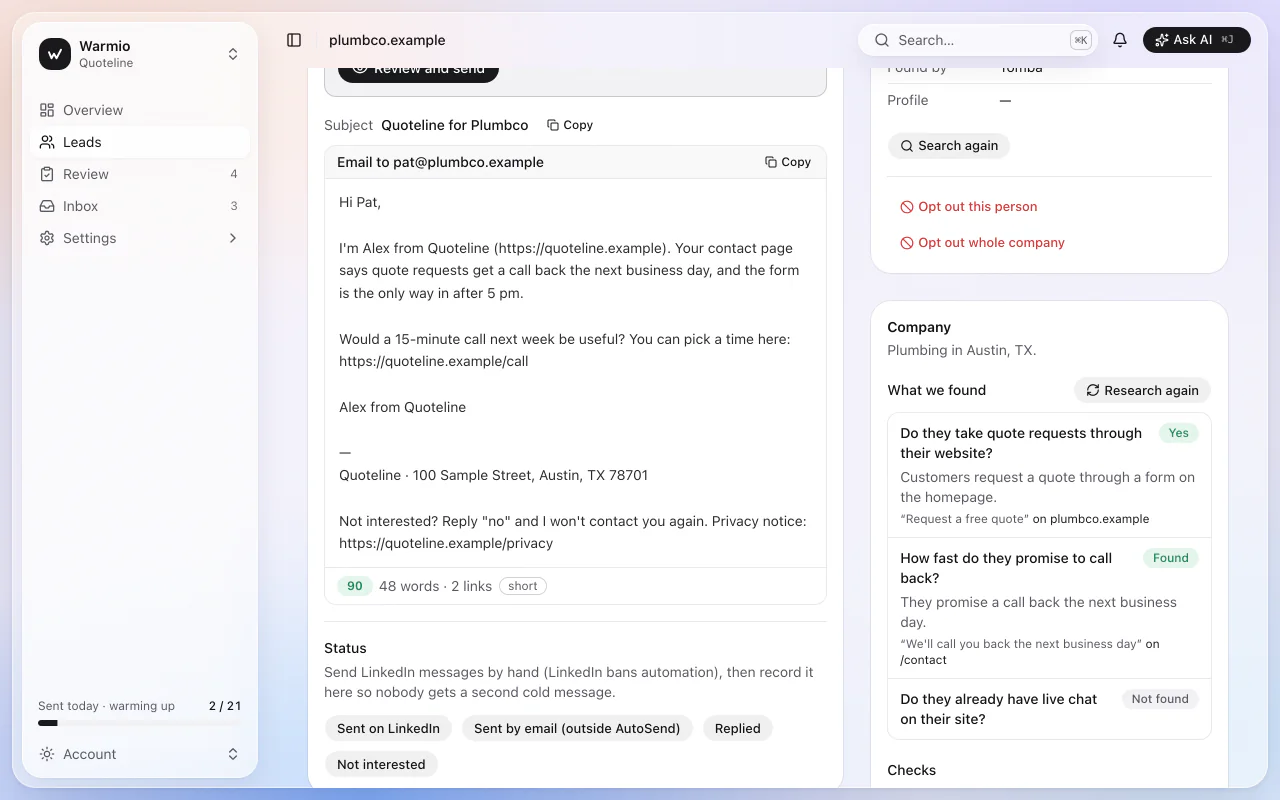
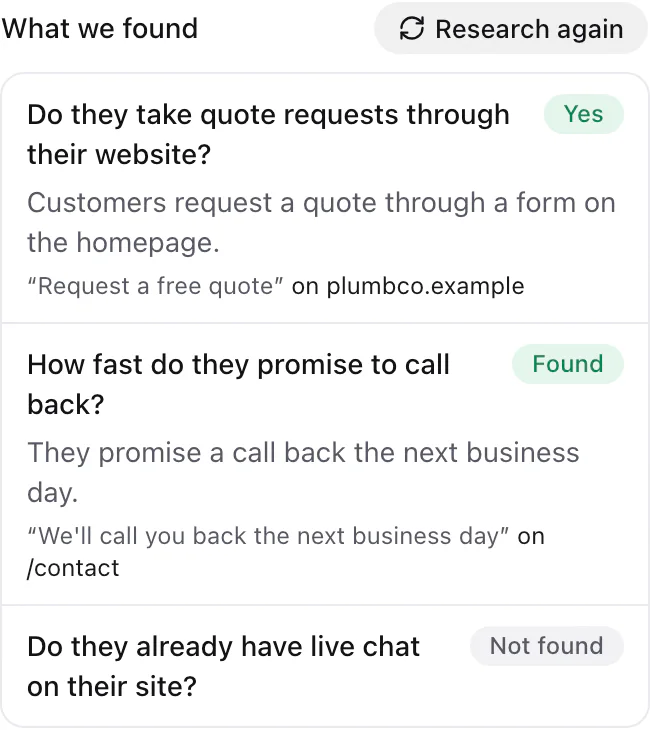
Research questions Ask what shows the problem, like whether they take quote requests online. Each company's answer comes from its own site, with the quote and the page, and moves its score. 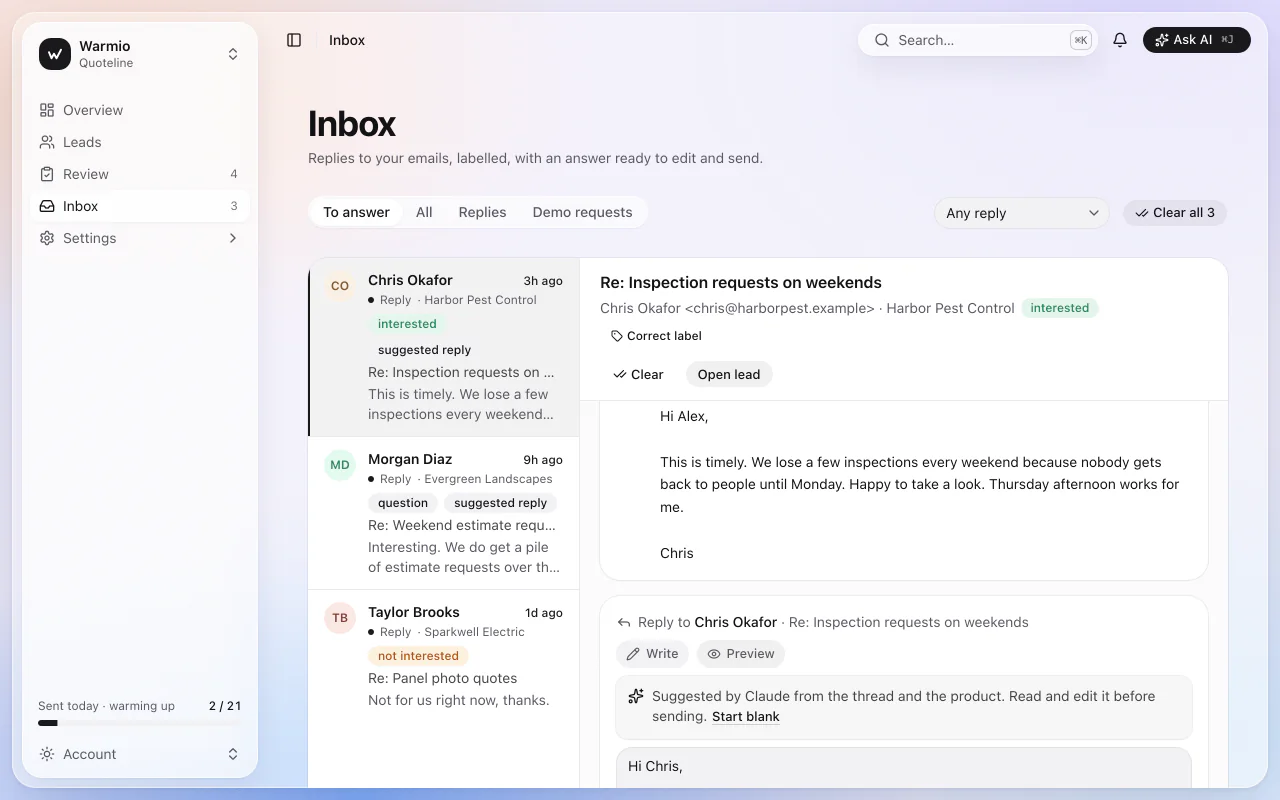
Inbox Each reply is labelled: interested, a question, not interested or out of office. Claude suggests an answer for you to edit and send. 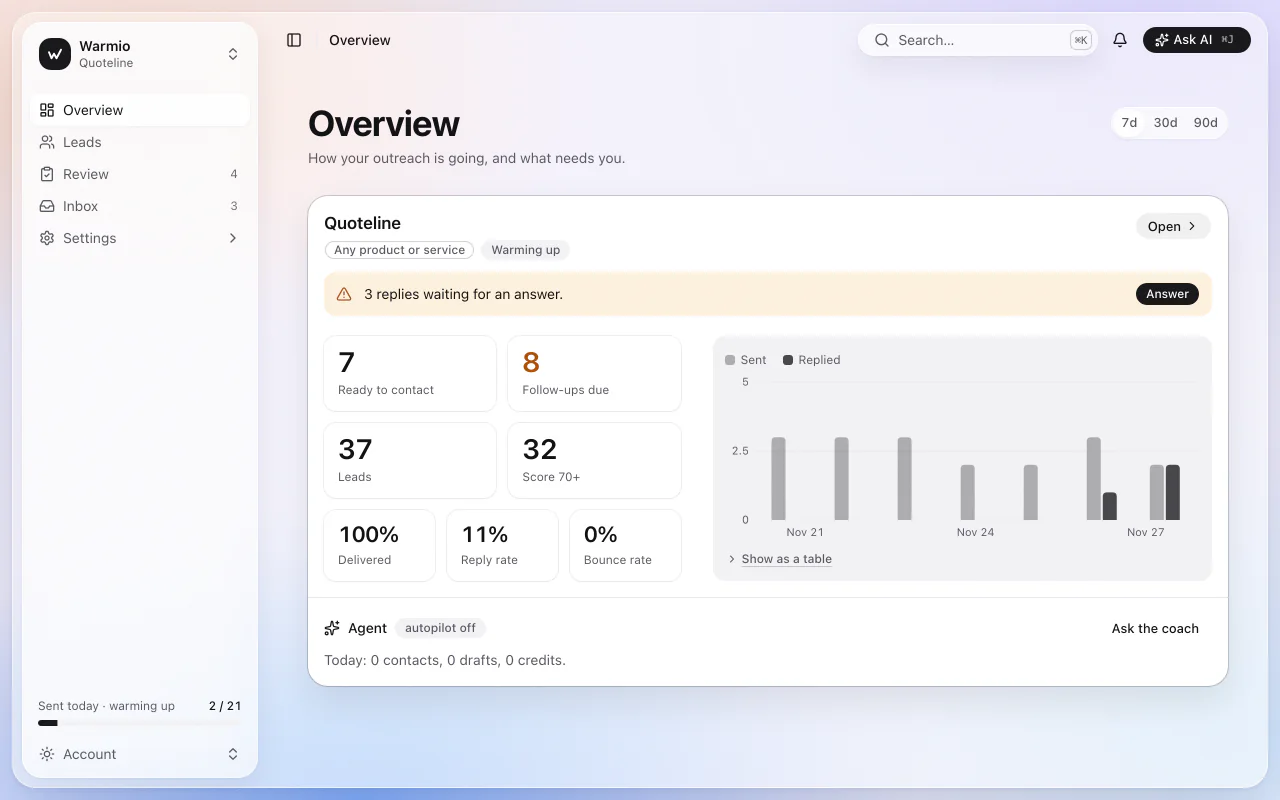
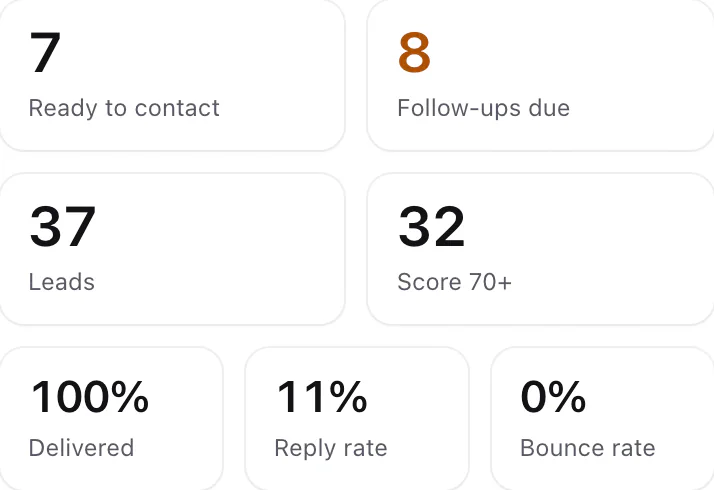
Overview Each product's leads ready to contact, follow-ups due, delivery, reply and bounce rates, and a chart of sends and replies over 7, 30 or 90 days. 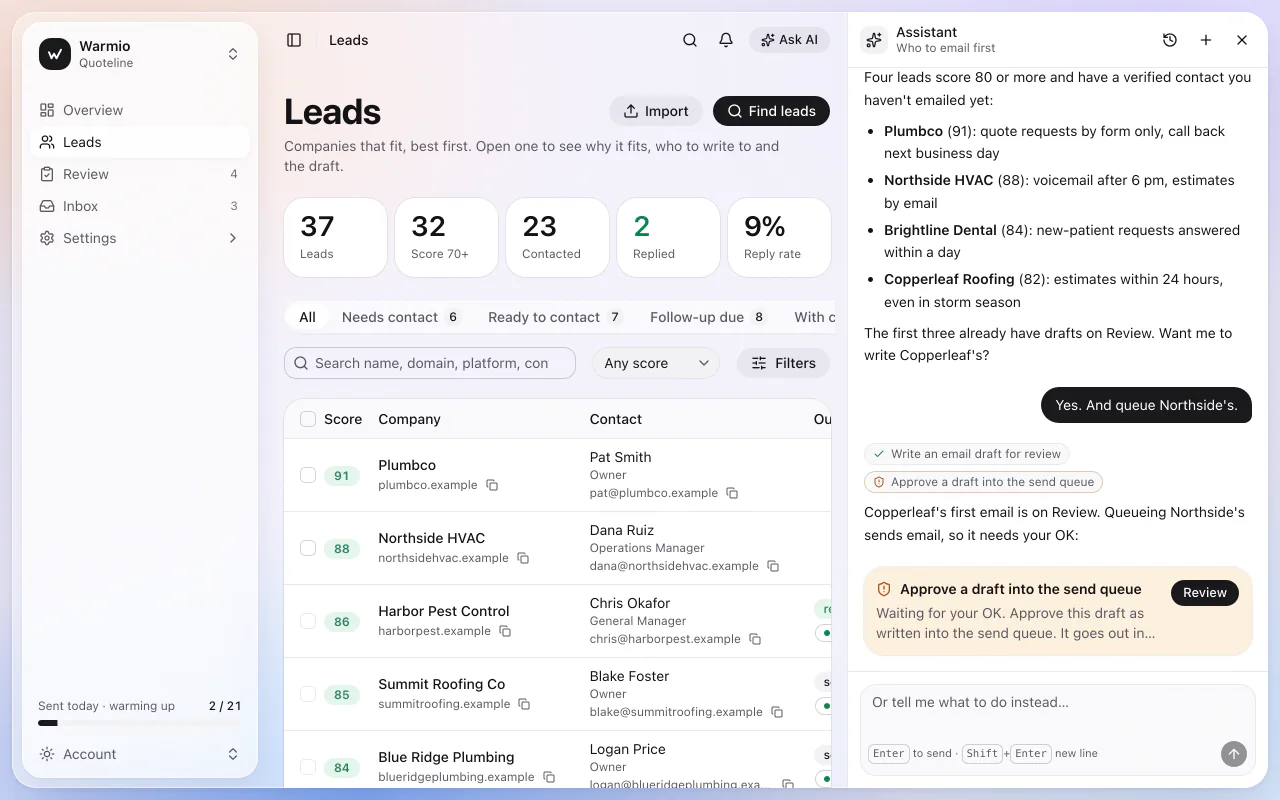
AI panel It uses the same tools as your agents, and asks you first before anything that spends credits or sends email.
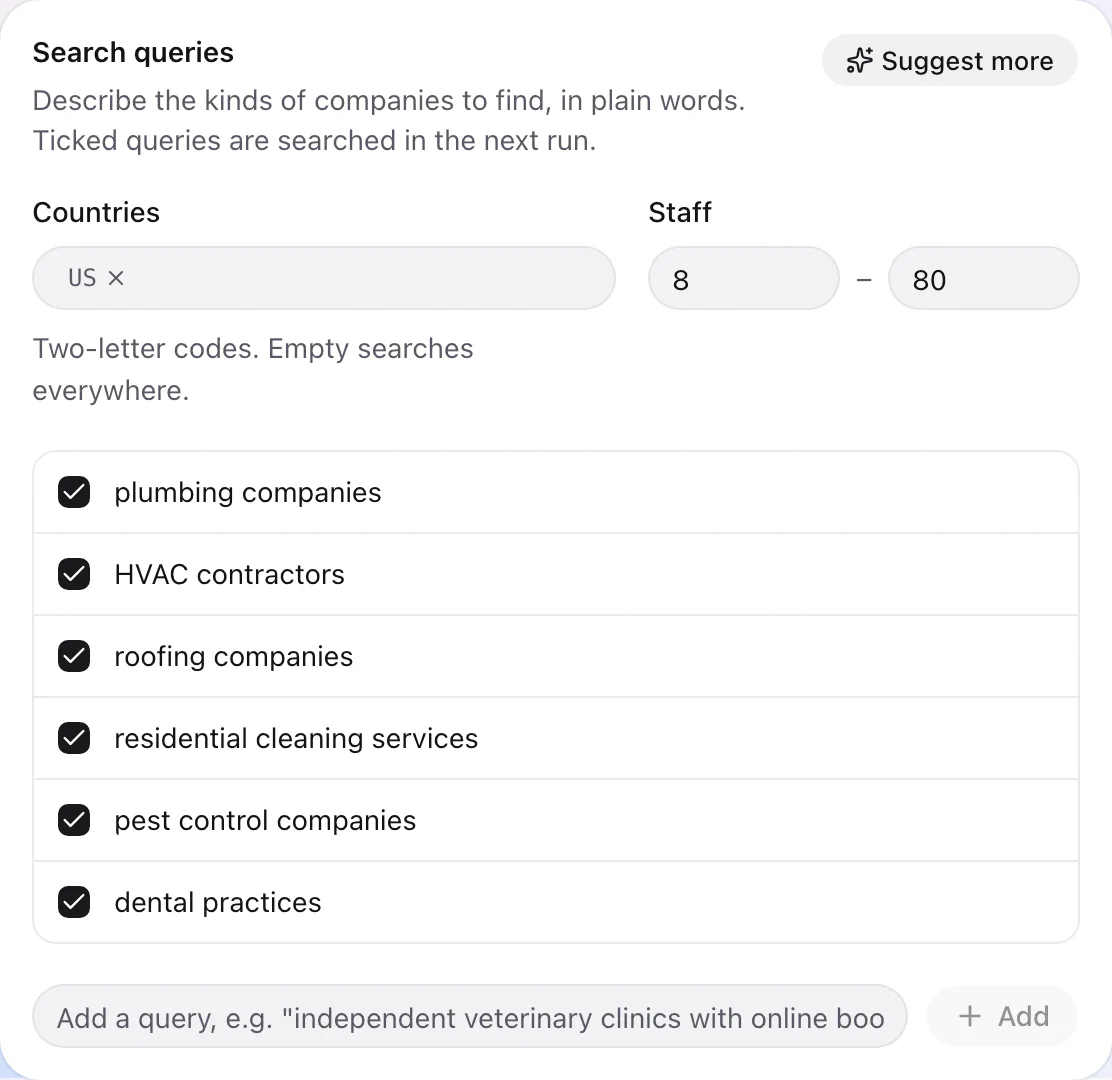

Searches written in plain words. Describe the companies you sell to, pick countries and size, and it searches, researches and scores them. Nothing spends credits until you start a run.
Sender reputation
Guard rails, by the numbers.
On by default, for you and for any agent you connect.
5→
Emails a day per domain. It starts at 5 and adds 2 each sending day.
1
Spam complaint pauses sending for the week. So do bounces over 3%.
days
Every change is kept in Activity, with who made it.
Compared with a typical volume-first bulk sender, not any named product.
For your agents
Let an agent do the legwork. Keep the final say.
Connect Claude Code, Claude Desktop or any MCP client with a key made in Settings.
Agent keys
A key per agent. Revoke it any time.
Each key has its own permissions, products and expiry. Everything it changes shows in Activity with its name.
- Permissions
- Read, write, send
- Products
- Only the ones you pick
- Expiry
- You set it
- Revoke
- Any time
- Can
- ReadWriteSend email
- Sees
- LocalInbox only
- Expires
- In 90 days
Autopilot
Off until you turn it on.
Each day it can find contacts and write first emails and due follow-ups for you to review. It approves on its own only if you let it.
- By default
- Off
- Follow-ups
- Drafted to Review
- Auto-approve
- Score 85 and up
- Auto-approve limit
- 3 a day
For agencies
Run outreach for your clients, under your name.
Each client is a product with its own pitch, sending address, leads and stats. You do the work; they see and approve their own.
Client logins
Clients see their own work, and approve it.
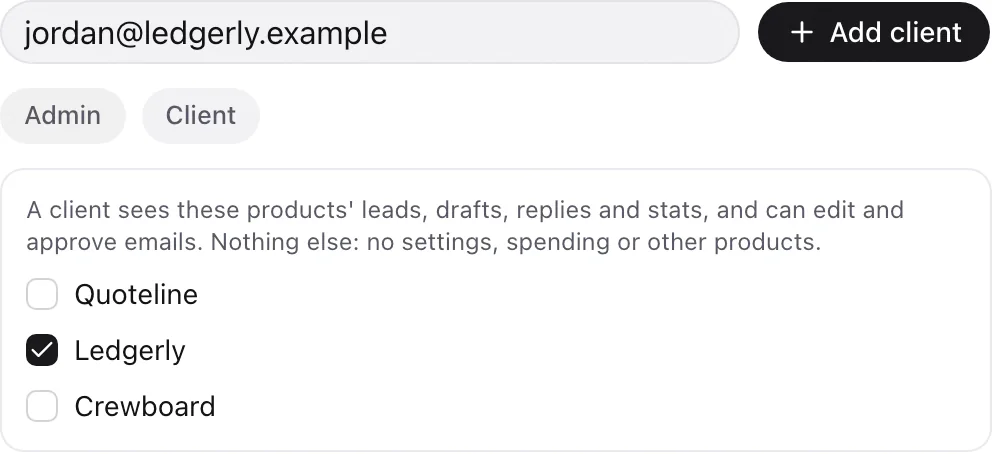
Add a client in Settings and tick their products. They sign in to see those leads, drafts, replies and stats, and can edit, approve or skip drafts. Their approvals pass the same caps, warm-up and opt-out checks as yours.
- They see
- Their products only
- They can
- Edit and approve drafts
- Off limits
- Settings, keys, credits
- Sign-in
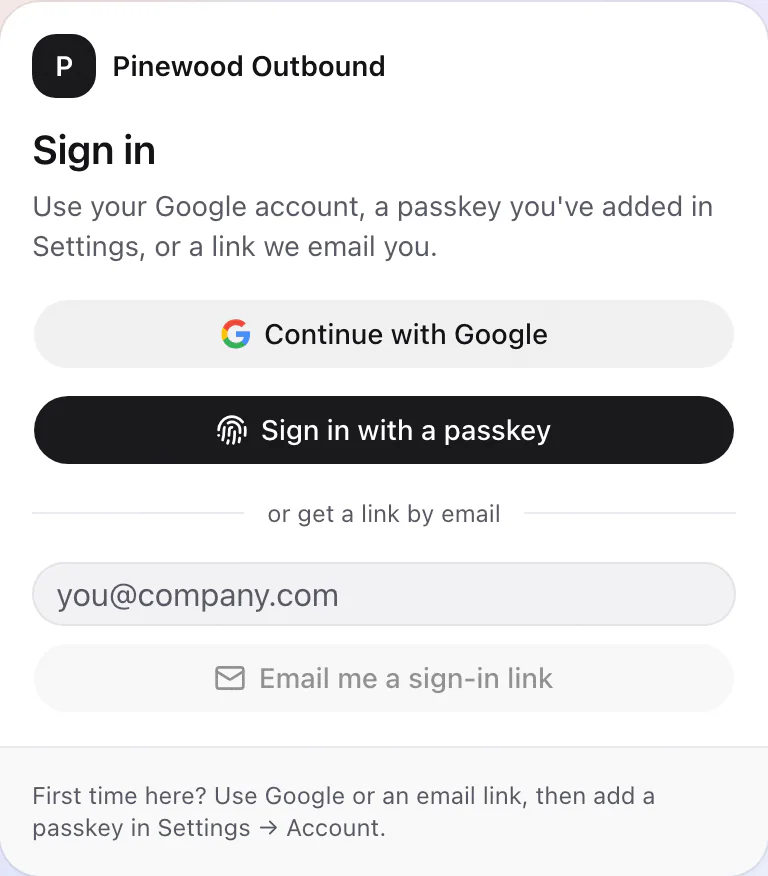
- Google, link or passkey
Spend per client
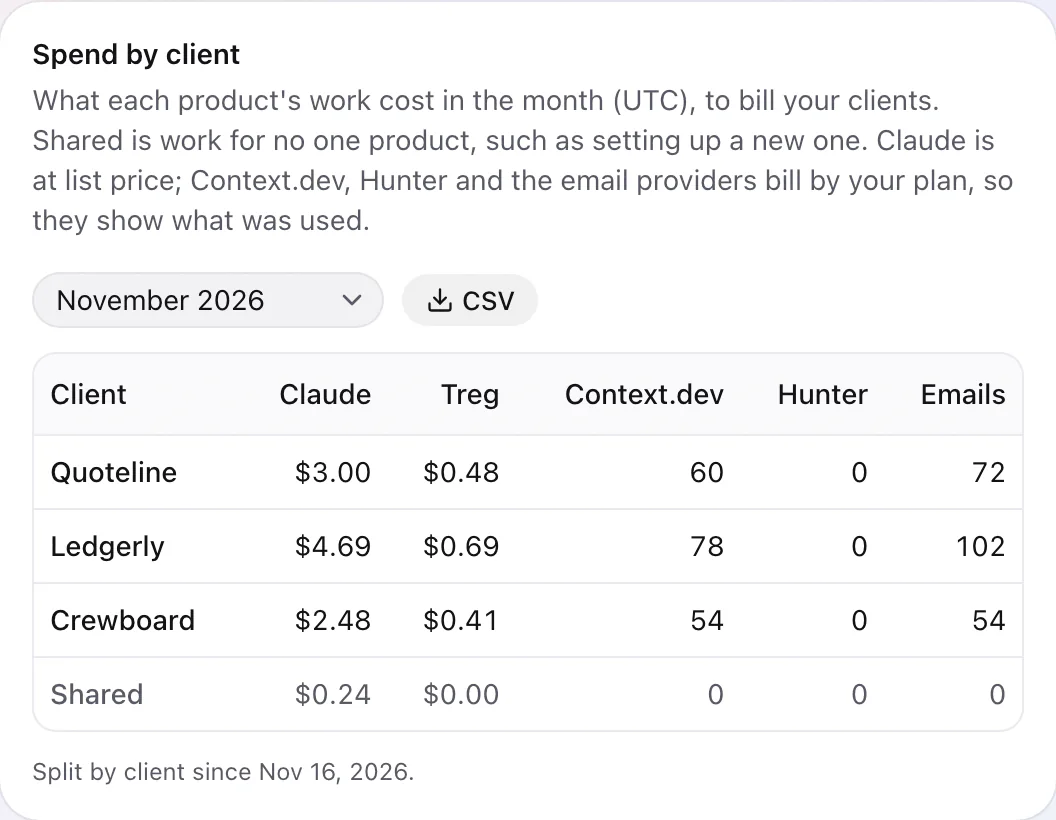
See what each client cost.
Every paid call is recorded against the client it was for: Claude, lead data, email checks and sends. Pick a month and download a CSV to invoice from.
- Split by
- Client and supplier
- Months
- The last 12
- Download
- CSV
- Setup work
- Shown as Shared
Your brand
Your agency’s name on it.
Set your name in Settings. Clients see it in the sidebar and on the sign-in page, and it's on sign-in and notification emails and the MCP server.
- Sign-in page
- Your name
- Emails
- Sign-in and notifications
- MCP server
- Named after you
- Front page
- Opens your sign-in
Opt-outs count for every client
Someone who opts out of one client's emails gets none from your other clients either.
We host it
Your agency gets its own deployment and database, run by us on Cloudflare. There's nothing to install.
We watch the sending
Our check reads totals only, like sends, replies and bounces, never client names or emails. If sending goes wrong, we can stop it at once; approved emails wait in the queue.
Agency pricing isn’t set yet. Join from here and we’ll know you’re an agency.
No spam. One email when a spot opens.
Pricing early pricing
Pay for leads you can use. Every plan has every feature.
Choose how many leads each month, or host it yourself and pay once.
Starter
Leads, Claude and lead data in one price.
$59
a month · Billed monthly
Get early accessWhat’s included
- 300 leads a month
- Claude included
- Lead data included
- Unlimited seats
- Unlimited products
- Follow-ups and reply handling
- Warm-up and auto-pause
- MCP access with scoped tokens
- Activity log
Growth
SuggestedThe same, with more leads each month.
$99
a month · Billed monthly
Get early accessWhat’s included
- 800 leads a month
- Claude included
- Lead data included
- Unlimited seats
- Unlimited products
- Follow-ups and reply handling
- Warm-up and auto-pause
- MCP access with scoped tokens
- Activity log
Self-host
One timeRun Warmio on your own Cloudflare account, with your own keys.
$499
paid once · No monthly fee
Get early accessWhat’s included
- Full source code
- 12 months of updates
- Setup help
- Your own keys, stored encrypted
- Unlimited seats
- Unlimited products
- Follow-ups and reply handling
- Warm-up and auto-pause
- MCP access with scoped tokens
- Activity log
What’s a lead? A company that fits, with a contact, a verified work email and a first draft ready for you to approve. Lookups that find nothing are not counted. Researching and scoring companies is not counted.
Billed monthly. Cancel any time. Pay yearly and save up to 40%.
What one lead includes
Compared with buying the two kinds of tool separately, not any named product.
Who is it for?
Solo founders and small teams who do their own outbound and would rather send 15 emails that fit than 500 that don't. And agencies that do outbound for their clients.
Does it send email on its own?
Not unless you turn that on. Every email waits for your approval. You can let autopilot approve drafts for your best-scoring leads, or give an agent a key that may send; either way daily caps, warm-up and opt-outs still apply, and every send shows in Activity.
What will it cost?early pricing
Starter is $59 a month with 300 leads, and Growth is $99 with 800; both include Claude and lead data. Billed monthly. Cancel any time. Pay yearly and save up to 40%. Or host it yourself for $499, paid once. Pricing isn't final yet.
What counts as a lead?
A lead is a company that fits, with a contact, a verified work email and a first draft ready for you to approve. Lookups that find nothing are not counted. Researching and scoring companies is not counted.
Can I host it myself?
Yes. For $499, paid once, you get full source code, 12 months of updates and setup help. It runs on your own Cloudflare account, and it keeps running after the 12 months of updates end.
What else do I pay when I host it myself?
Your own Cloudflare, Anthropic, lead-data and AutoSend accounts, billed to you by those suppliers. There's no markup from us. You add the keys in Settings, where they are stored encrypted; only the last four characters are shown after that.
Can my own AI agent use it?
Yes. Connect Claude Code, Claude Desktop or any MCP client with a key made in Settings. Each key has its own permissions, product limit and expiry, can be revoked at any time, and everything it changes is recorded with its name.
Can an agency run it for clients?
Yes. Each client is a product with its own pitch, sending address, leads and stats, and a client can sign in to see and approve their own work. Settings → Spend splits costs by client for invoicing, and the sign-in page and emails carry your agency's name. Agency pricing isn't set yet.
What do you see of an agency's clients?
Each agency has its own deployment and database. Our check across agencies reads totals only, such as spend, emails sent, replies and bounces. It never gets a client's name, an address or an email.
Is it a mass-mailer?
No, and it isn't a list you buy. Good targeting and a real problem get replies; software can't invent them. You set the signals.
When does the beta open?
We're proving the results on our own products first. Beta spots open in small batches, and early access sign-ups are invited in order.